
Skip to content
Gloucester County Amateur Radio Club

Gloucester County Amateur Radio Club

Skunkworks Advanced Project Team

Menu
  • Home
  • Clubhouse
    • The GCARC Clubhouse
    • Grounding Project
    • Networking Infrastructure
    • Work and Test Bench
    • Clubhouse Satellite Station
      • Satellite Rotator Controller
    • SatNOGS Ground Station
    • Earth-Moon-Earth (EME)
    • Discovery Satellite Snooping Dish
    • GOES-19 Satellite Reception
    • Clubhouse Remote nRSP-ST Resource
    • Skunkworks GitHub Resource
    • ISS SSTV
    • NOAA Weather Fax
    • ADS-B
  • Technical Activities and Resources
    • 3D Printed Projects
    • DMR
      • Using DM-1701 CPS Program
      • Open GD77 on Baofeng DM1701
    • Software-Defined Radios
      • Installing an RTL-SDR on a Windows PC
      • Software Defined Radio Demystified
    • Meshtastic
      • Getting Started with Meshtastic on 915 MHz
      • How to Join the GCARC Channel on Your Meshtastic Device Using a QR Code
      • Window-Mounted 915 MHz Meshtastic Yagi Antenna Project
    • BTECH UV-PRO Radio
      • Satellite Mode for the UV-PRO
    • TIDRADIO H3 Resources
      • TIDRADIO TD-H3 Transceiver: Comprehensive Briefing
      • Overview of Stock Firmware Menu System
      • Comparison of Stock TIDRADIO Firmware vs. nicFW V2 Firmware
    • Balloon Project
      • Balloon Launch – 2025-03-17
    • Tech Saturday Presentations
  • STEM Club and Camp
  • Public Service
    • Winlink VHF and HF Gateways
    • APRS Weather Reporting Station
    • AREDN Development
  • The Foundation
  • Blog
  • Contact

Using DM-1701 CPS Program

The Baofeng DM-1701 CPS software is used to program the radio.

Even if you plan to flash the radio with GD77, it is a good idea to back up the factory configuration in case you want to restore if after trying GD77.

These instructions will guide you through installing the Baofeng CPS software and creating a backup of the configuration

Download and Install CPS and USB Driver

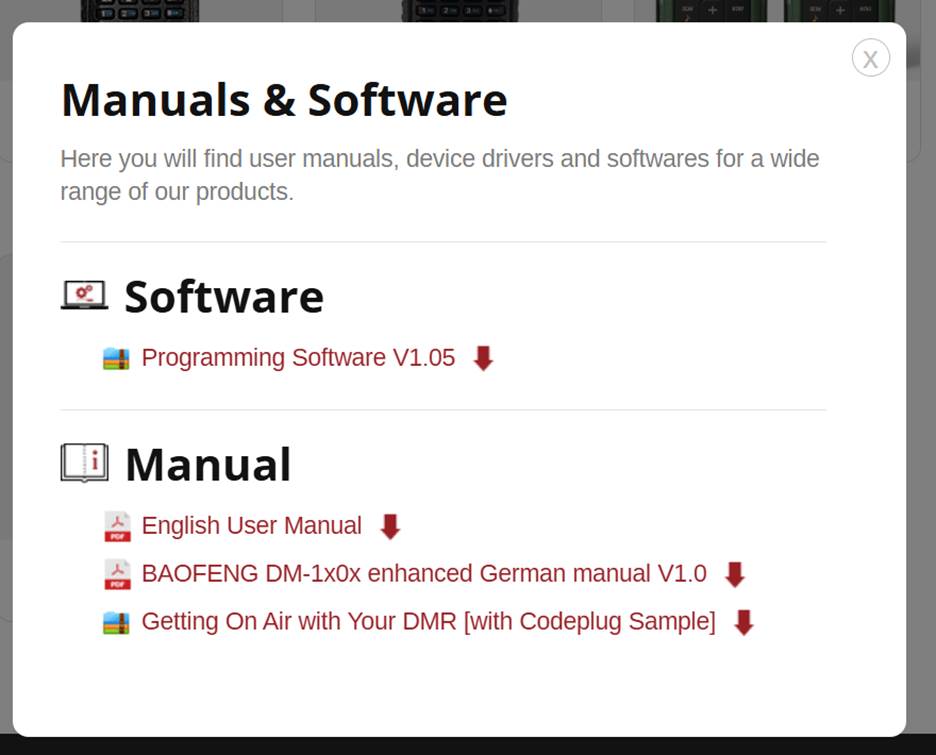
Download the Baofeng CPS (programming) software for DM-1701

https://www.radioddity.com/pages/baofeng-download

Scroll to bottom, choose DM-1701, click to expand.

Download Programming Software V1.05 and install.

Optionally download English User Manual (formatted for letter paper instead of the small booklet included with the radio).
The DM-1701 DMR Radio does NOT use a USB-to-serial cable for programming. So, there is no COM port associated with the radio, and software that depends on a COM port will not work.

Instead, the provided Baofeng DM-1701 cable is a straight-thru connection to the STM32 MCU (microcontroller unit) in the radio. STM drivers must be installed for the CPS to communicate with the radio using Baofeng DFU protocol that is programmed into the radio.

For Win10, use the STM Dfuse driver available here. This is the same driver used by the GD77 project.

https://www.sa0bux.se/Ham/opengd77/Dfuse_3.0.6_drivers.zip
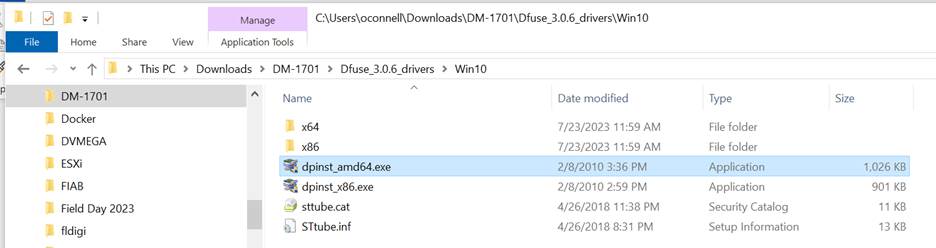
For Win10 64-bit, install dpinst_amd64.exe

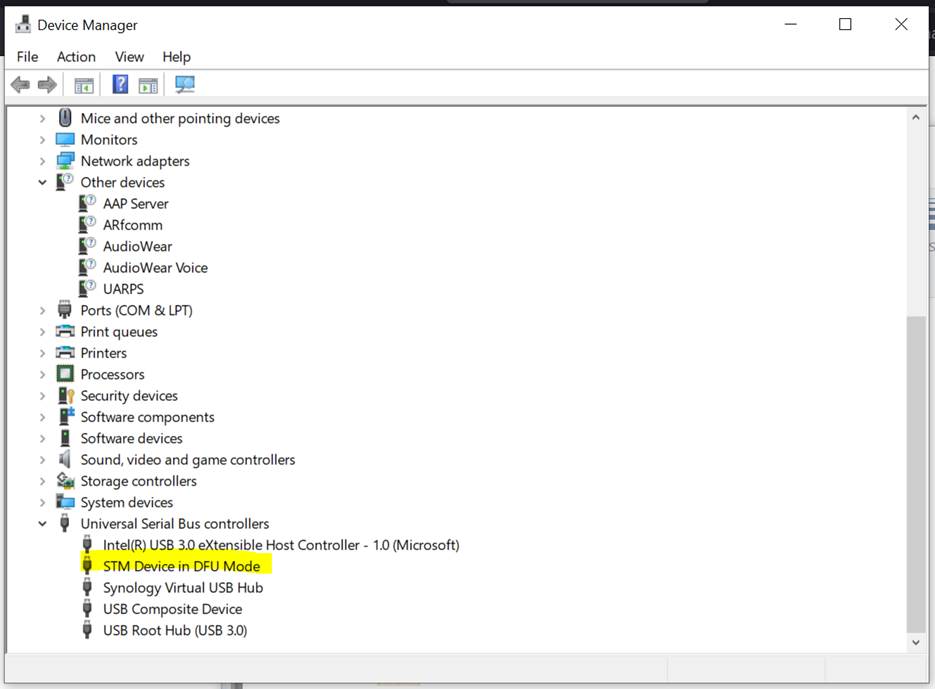
Connect USB cable to PC and radio and turn on radio.

Radio should show up in Device Manager as “STM Device in DFU Mode”
Create Configuration Backup

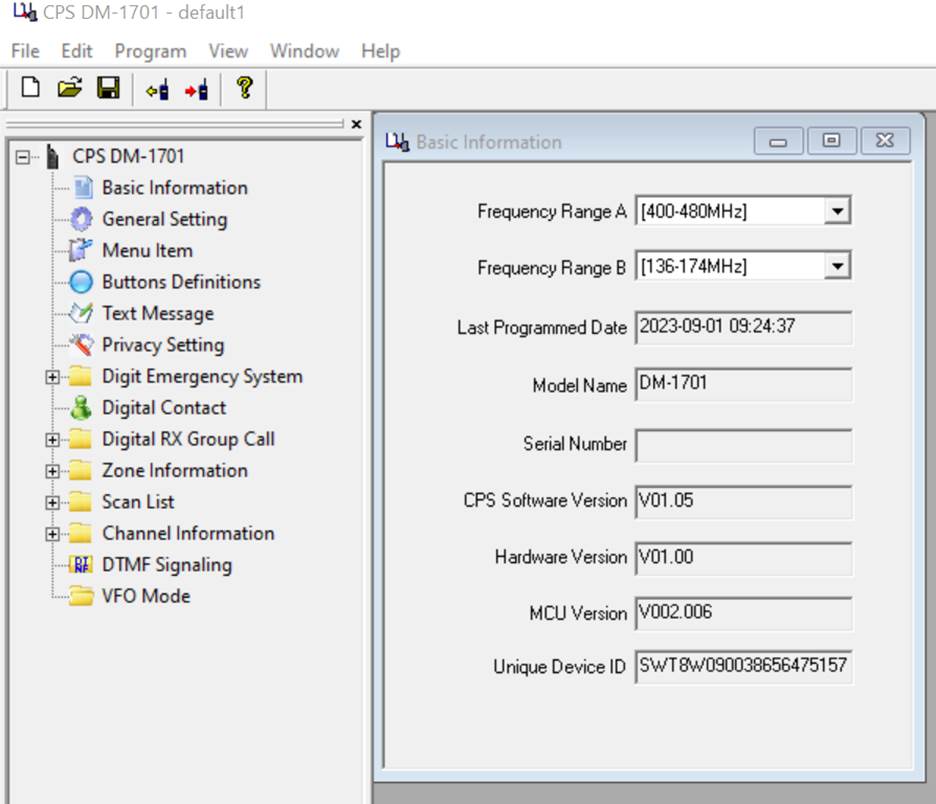
Run the CPS DM-1701 program.

Select “Program/Read data” to read the factory configuration from the radio.

Select “File/Save As’ to save the configuration to be able to later restore to factor defaults.
Program the Radio

You can now program the radio or proceed to install GD77.

If you decide to revert to factory, flash with the factory firmware and reload the saved configuration file.

Archives

  • July 2024
  • November 2023
  • April 2023
  • March 2023
  • June 2022
  • July 2021
  • April 2021
  • March 2021
  • September 2020
  • September 2019
  • August 2019
  • July 2019
  • June 2019
  • December 2018
  • November 2018
  • October 2018
  • September 2018
  • August 2018
  • July 2018
  • June 2018
  • May 2018
  • April 2018

Categories

  • Balloon
  • Clubhouse Infrastructure
  • Digital Position Tracking
  • Raspberry Pi
  • Satellite Images
  • Satellite Operations
  • Satellite Telemetry
  • SDR
  • Uncategorized

Meta

  • Log in
  • Entries feed
  • Comments feed
  • WordPress.org
  • Home
  • Clubhouse
    • The GCARC Clubhouse
    • Grounding Project
    • Networking Infrastructure
    • Work and Test Bench
    • Clubhouse Satellite Station
      • Satellite Rotator Controller
    • SatNOGS Ground Station
    • Earth-Moon-Earth (EME)
    • Discovery Satellite Snooping Dish
    • GOES-19 Satellite Reception
    • Clubhouse Remote nRSP-ST Resource
    • Skunkworks GitHub Resource
    • ISS SSTV
    • NOAA Weather Fax
    • ADS-B
  • Technical Activities and Resources
    • 3D Printed Projects
    • DMR
      • Using DM-1701 CPS Program
      • Open GD77 on Baofeng DM1701
    • Software-Defined Radios
      • Installing an RTL-SDR on a Windows PC
      • Software Defined Radio Demystified
    • Meshtastic
      • Getting Started with Meshtastic on 915 MHz
      • How to Join the GCARC Channel on Your Meshtastic Device Using a QR Code
      • Window-Mounted 915 MHz Meshtastic Yagi Antenna Project
    • BTECH UV-PRO Radio
      • Satellite Mode for the UV-PRO
    • TIDRADIO H3 Resources
      • TIDRADIO TD-H3 Transceiver: Comprehensive Briefing
      • Overview of Stock Firmware Menu System
      • Comparison of Stock TIDRADIO Firmware vs. nicFW V2 Firmware
    • Balloon Project
      • Balloon Launch – 2025-03-17
    • Tech Saturday Presentations
  • STEM Club and Camp
  • Public Service
    • Winlink VHF and HF Gateways
    • APRS Weather Reporting Station
    • AREDN Development
  • The Foundation
  • Blog
  • Contact

Gloucester County Amateur Radio Club 2025 . Powered by WordPress