
A Club-Wide Propagation Research Network
Gloucester County Amateur Radio Club · W2MMD · Spring 2026
1. Executive Summary
The GCARC WSPR Network is a club-wide collaborative project in which members build, deploy, and operate their own WSPR (Weak Signal Propagation Reporter) beacons from their home stations. Each member builds a low-cost, self-contained beacon using a TAPR Universal WSPR HAT kit and a Raspberry Pi Zero 2W. Once on the air, beacons transmit automatically 24/7, uploading propagation spot data to public databases that the entire club can then analyze together.
The project teaches Raspberry Pi and Linux skills, antenna design, RF kit-building, and data analysis — all in the context of real amateur radio experimentation. It is accessible to all license classes, generates meaningful propagation science, and grows in value the more members participate.
| Project Status — March 2026 |
| ✅ TAPR confirmed: full availability of all kits needed at the member rate for a W2MMD group purchase. |
| ⚠️ Raspberry Pi Zero 2W with headers (Adafruit #6008, $15) — confirmed in stock. Group order pending final participant count. |
| 📅 Main announcement: April 1, 2026 General Membership Meeting. Sign-ups to follow. |
2. What Is WSPR?
WSPR (pronounced “whisper”) stands for Weak Signal Propagation Reporter. It is a digital radio protocol developed by Nobel Prize laureate Joe Taylor, K1JT, specifically designed to probe ionospheric propagation paths using the minimum possible transmitter power.
How It Works
Each WSPR transmission is exactly 110.6 seconds long and carries just three pieces of information — the operator’s callsign, 4-character Maidenhead grid square, and transmitter power in dBm. The encoded message is only 40.5 bytes, but it uses sophisticated forward error-correcting code that allows receiving stations to decode signals 28 dB below the noise floor. A 200 mW WSPR beacon can reliably be heard across continents under the right ionospheric conditions.
The Pi Zero generates the WSPR signal entirely in software using its GPIO clock pin. The TAPR HAT amplifies this to 100–200 mW and passes it through a band-specific low-pass filter to suppress harmonics, producing a clean, legal transmission. No operator interaction is required — the system starts automatically on boot and transmits on a 10-minute duty cycle.
The Global Network
There are thousands of WSPR receive stations around the world operating around the clock. Every decoded spot is uploaded in real time to public databases. The wspr.live database alone holds more than 4 billion individual spot records, all freely queryable via a public SQL API. Every transmission your beacon makes is logged globally, and you can review your station’s performance from any web browser within minutes of transmitting.
3. Hardware
3.1 TAPR Universal WSPR HAT
The TAPR (Tucson Amateur Packet Radio) Universal WSPR HAT is the transmitter board for this project. TAPR is a respected nonprofit amateur radio organization that has been developing and selling amateur radio hardware since 1982.
| [Insert TAPR WSPR HAT board photo here — download from tapr.org/product/wspr] |
TAPR Universal WSPR HAT — available at tapr.org/product/wspr
Key specifications:
- Price: $32.00 per kit (member rate for W2MMD group purchase confirmed)
- Kit format: Surface-mount components pre-installed. User solders 8 through-hole low-pass filter parts (inductors and capacitors — no toroids required)
- Output power: 100–200 mW (adjustable via on-board trimmer potentiometer)
- Connector: BNC, located on the side opposite the Pi USB ports
- Includes on-board shutdown button integrated with WsprryPi software
- Available for all HF bands (160m through 6m) — each kit is band-specific
- Source: tapr.org/product/wspr — all bands confirmed in stock
IMPORTANT — Board orientation: When mating the HAT to the Pi, the BNC connector will be on the LEFT side and the Pi USB connectors on the RIGHT. It is possible to misalign the 40-pin GPIO header by one row — always verify alignment before applying power.
3.2 Raspberry Pi Zero 2W with Pre-Soldered Headers
The recommended single-board computer for this project is the Raspberry Pi Zero 2W with pre-soldered GPIO headers (Adafruit product #6008, $15, confirmed in stock March 2026).
| [Insert Raspberry Pi Zero 2W photo here — available at adafruit.com/product/6008] |
Raspberry Pi Zero 2W with headers — Adafruit #6008 — adafruit.com/product/6008
- Processor: Broadcom BCM2710A1 — quad-core 64-bit Arm Cortex-A53 at 1 GHz
- RAM: 512 MB LPDDR2 SDRAM
- Connectivity: 2.4 GHz Wi-Fi (802.11 b/g/n) · Bluetooth 4.2 / BLE
- GPIO: 40-pin header pre-soldered — plugs directly onto the TAPR HAT
- Storage: MicroSD card slot
- Power: Micro-USB, 5V / 1A minimum (regulated supply required)
- Price: $15.00 (Adafruit #6008 — confirmed in stock)
IMPORTANT — Pi 5 not supported: The WsprryPi software uses the Pi’s PWM/clock peripheral to generate the WSPR signal. The Raspberry Pi 5 has a different peripheral architecture and is NOT compatible. Use Pi Zero 2W, Pi 3, or Pi 4 only.
3.3 Complete Bill of Materials
| Component | Source | Cost |
| TAPR Universal WSPR HAT (band-specific kit) | tapr.org/product/wspr | $32.00 |
| Raspberry Pi Zero 2W with headers (Adafruit #6008) | adafruit.com/product/6008 | $15.00 |
| MicroSD Card 32 GB (pre-imaged at Tech Saturday) | Club supplied | $8.00 |
| 5V / 1A USB Power Supply (regulated) | Various | $8.00 |
| Wire Dipole Antenna (materials, home build) | Home build | ~$10.00 |
| TOTAL PER MEMBER | ~$73.00 |
Note: TAPR has confirmed availability and will honor the member rate for a W2MMD group purchase. Final order placed after the April 1 meeting. Individual members may also order directly from tapr.org.
3.4 System Diagram
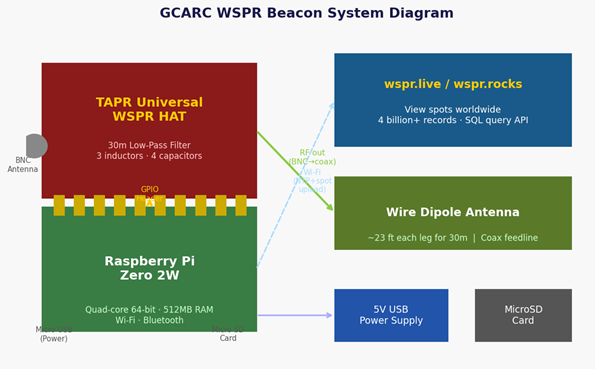
Figure 1: GCARC WSPR Beacon System — Pi Zero 2W + TAPR HAT + Antenna + Internet
4. Software Setup
4.1 Operating System — Raspberry Pi OS
The Pi Zero 2W runs Raspberry Pi OS (Debian Trixie) 64-bit Lite. The Lite image has no desktop, which is appropriate for this headless server use case. Once configured, the beacon runs entirely over the network via SSH or its built-in web interface.
Download and image your SD card using the Raspberry Pi Imager:
- Download URL: raspberrypi.com/software
- Select: Raspberry Pi Zero 2W → Raspberry Pi OS (other) → Raspberry Pi OS Lite (64-bit, Trixie)
- Use the Imager’s customization (gear icon) to pre-configure: Wi-Fi SSID/password, SSH enabled, hostname, timezone
- Club Tech Saturday sessions will pre-image SD cards — bring a blank 32 GB microSD card
Note: Raspberry Pi Imager 2.0.6 on Windows 11 has a known issue writing Trixie images for the Zero 2W. If you have boot problems, try balenaEtcher (etcher.balena.io) as an alternative.
4.2 WsprryPi Software
The WSPR transmitter software is WsprryPi v2.x, developed by Lee Bussy (AA0NT) — the official software recommended by TAPR for use with the TAPR WSPR HAT.
- GitHub: github.com/lbussy/WsprryPi
- Documentation: wsprry-pi.readthedocs.io
- Installation: single-line curl script — installs all dependencies, compiles on-device, sets up auto-start as a systemd service
- Compile time on Pi Zero 2W: approximately 25–35 minutes (done once only)
- Configuration: via web browser on your PC/Mac at http://[hostname].local — no command line required after install
4.3 Time Synchronization
WSPR transmissions must begin within one second of the UTC 10-minute boundary. The Pi Zero 2W uses NTP over Wi-Fi to maintain this accuracy. Internet connectivity is therefore required at all times during operation.
5. Band and Frequency Selection
Each TAPR HAT kit is band-specific — the low-pass filter determines the operating band. A $32 kit covers one band. Select based on license class, antenna situation, and propagation interests.
| Band | WSPR Freq | Dipole | License | Propagation Notes | Cost |
| 160m | 1.8366 MHz | ~128 ft | General | NVIS only, night. Very large antenna. | $32 |
| 80m | 3.5686 MHz | ~66 ft | General | Regional NVIS, excellent nighttime DX. | $32 |
| 40m | 7.0386 MHz | ~33 ft | General | Day and night. Great regional + DX. | $32 |
| 30m ★ | 10.1387 MHz | ~23 ft | General | RECOMMENDED. WARC band — no contests. Reliable 24/7. | $32 |
| 20m | 14.0956 MHz | ~16 ft | General | Best global DX. Most spotters. Daytime. | $32 |
| 17m | 18.1046 MHz | ~13 ft | General | Excellent daytime DX. WARC — contest-free. | $32 |
| 15m | 21.0946 MHz | ~11 ft | General | Good DX at solar max. Daytime only. | $32 |
| 10m ✓ | 28.1246 MHz | ~8 ft | Technician OK | Outstanding DX when open. Smallest antenna. | $32 |
| 6m | 50.293 MHz | ~4.5 ft | Technician OK | Sporadic-E openings. Excellent propagation data. | $32 |
★ 30 meters is recommended for most members. WARC band (no contests), reliable 24/7 DX, manageable antenna (~46-ft wire dipole).
✓ 10 meters is recommended for Technician licensees. Digital modes permitted at 28 MHz. With current high solar activity, 10m is producing outstanding DX propagation.
6. Antennas
6.1 Using Your Existing HF Antenna
No dedicated antenna is required to get started. Because WSPR transmits at only 200 mW on a 10-minute duty cycle, it coexists peacefully with normal station operation. Simply connect the beacon’s BNC output to your existing HF antenna when you are not operating. A coax switch or T-connector makes this convenient.
6.2 Building a Dedicated Wire Dipole
A simple half-wave wire dipole can be built for approximately $10 in materials in about 20 minutes. A wire dipole is ideal for WSPR because its bidirectional pattern provides good coverage of both the eastern US and Europe.
Wire lengths (each leg, measured from center insulator):
| Band | Each Leg | Total Length | WSPR Frequency |
| 40m | ~33 ft | ~66 ft | 7.0386 MHz |
| 30m | ~23 ft | ~46 ft | 10.1387 MHz |
| 20m | ~16.4 ft | ~32.8 ft | 14.0956 MHz |
| 10m | ~8.4 ft | ~16.8 ft | 28.1246 MHz |
Materials: 18–22 AWG stranded copper wire, center insulator, two end insulators, coax feedline with BNC connector, support rope.
6.3 Antenna Variants
One planned Tech Saturday session will cover antenna design and construction in detail:
- Half-wave wire dipole — simple, bidirectional, low cost, proven performer
- Inverted-V dipole — single center support, more omnidirectional, great for limited yard space
- End-Fed Half-Wave (EFHW) — requires a 49:1 or 64:1 matching transformer (winding opportunity — see 6.4), needs only one support point
- Random wire + ATU — use your existing installation with a common-mode choke at the rig end
- Vertical with radials — omnidirectional, excellent for DX but requires a ground system
6.4 Coil-Winding Opportunities
This project provides practical coil-winding experience — a foundational skill in amateur radio construction:
- TAPR HAT low-pass filter inductors: The kit includes air-core inductors; members who want to explore can wind their own on T50-2 or T50-6 toroid cores using the supplied specifications.
- EFHW matching transformer (49:1 or 64:1 unun): Wind a trifilar transformer on an FT-140-43 ferrite core to build an end-fed half-wave matching unit. Excellent beginner coil-winding project.
- Common-mode choke (1:1 current balun): Wind coax through FT-240-43 cores to suppress feedline noise — highly recommended for electrically noisy environments.
Coil-winding materials (toroids, ferrite cores, enameled wire) will be covered at the antenna session. GCARC may be able to arrange bulk purchases for interested members.
7. WSPR Receive Station
In addition to transmit beacons, the club plans to build a dedicated WSPR receive station at the W2MMD clubhouse. A receive station needs no transmit license and can operate on any band 24/7.
7.1 Hardware
- Raspberry Pi (any model with USB — Pi 4 or Pi 3B+ recommended for the clubhouse)
- RTL-SDR V3 USB dongle (~$35) — supports HF direct sampling without an upconverter
- HF receive antenna (existing club antenna or a dedicated receive wire)
7.2 Software — rtlsdr-wsprd
The receive software is rtlsdr-wsprd by Guenael Jouchet (VA2GKA), available at github.com/Guenael/rtlsdr-wsprd. This lightweight application decodes WSPR signals in real time from the RTL-SDR and uploads spots directly to wspr.live.
IMPORTANT: Do NOT use the librtlsdr-dev package from the distribution repository — it has a known bug that prevents HF direct sampling. Compile the rtl-sdr library manually from github.com/osmocom/rtl-sdr.
7.3 Multi-Band Receive
The RTL-SDR receives one frequency at a time, but multiple bands can be covered by running separate instances of rtlsdr-wsprd on a schedule via cron. The clubhouse station can scan 30m, 20m, 40m, and 17m automatically throughout the day.
7.4 Home Receive Stations
Any member can build their own home WSPR receive station with just a Pi and RTL-SDR dongle (~$50–60 total). Receiving is especially valuable for members with HOA restrictions and for gaining additional propagation data on bands where you are not transmitting.
8. Websites and Data Resources
Once your beacon is on the air, you can watch your transmissions propagate worldwide in near real time:
8.1 wspr.rocks — Live Interactive Map
wspr.rocks provides a real-time interactive map of WSPR spots worldwide, built on the wspr.live database. Recommended for:
- Watching your spots appear on the map within 2 minutes of transmitting
- Running SQL queries against the full historical database directly in the browser
- Filtering by callsign, band, date range, or reporting station
To find your own spots: go to wspr.rocks → SQL tab → enter: SELECT * FROM wspr.rx WHERE tx_sign=’W2MMD’ AND band=30 ORDER BY time DESC LIMIT 100
8.2 wspr.live — Direct Database Access
wspr.live is the public ClickHouse SQL API hosting the full WSPR spot database (4 billion+ records). No account or API key required. This is the data backend used by wspr.rocks and by Python scripts for AI-assisted analysis.
8.3 wsprnet.org — Original WSPR Network
wsprnet.org is the original WSPR spot repository. It hosts 24 hours of live data with a simpler activity map and statistics page. A good alternative view for members who prefer a traditional interface.
8.4 Raspberry Pi OS Download
raspberrypi.com/software — Download the Raspberry Pi Imager. Select: Pi Zero 2W → Raspberry Pi OS Lite (64-bit, Trixie).
8.5 WsprryPi Software
github.com/lbussy/WsprryPi — The WsprryPi GitHub repository with the one-liner installation script.
wsprry-pi.readthedocs.io — Full documentation and configuration instructions.
8.6 TAPR WSPR Product Page
tapr.org/product/wspr — Order TAPR WSPR HAT kits ($32 each, all HF bands). TAPR confirmed availability for the W2MMD group order.
8.7 Adafruit — Pi Zero 2W with Headers
adafruit.com/product/6008 — Pi Zero 2W with pre-soldered 40-pin header (Adafruit #6008, $15). Confirmed in stock as of March 2026.
9. Propagation Analysis and AI Integration
One of the most exciting aspects of the GCARC WSPR Network is the ability to pool all member station data and perform sophisticated, AI-assisted propagation analysis. Because wspr.live provides a public SQL API, Python scripts can automatically retrieve data and pass it to an AI model for interpretation.
9.1 Types of Analysis Available
- Band performance comparison — which band produces the most spots and at what times of day
- Path analysis — which geographic regions are being reached from FN20, and under what conditions
- Gray-line enhancement detection — automatic identification of the sunrise/sunset DX enhancement window
- Antenna comparison — comparing average SNR between club members at common reference stations to estimate relative antenna performance in dB
- Geomagnetic storm correlation — comparing spot rates against K-index data to visualize storm effects
- Solar cycle analysis — long-term trends in 10m propagation vs. sunspot number
- Member station comparison — ranking all W2MMD members by spot count, unique reporters, max distance, and best SNR
9.2 Sample Visualization — SNR Heatmap
The chart below shows a sample output of club-wide propagation analysis: median SNR across all HF bands by UTC hour. Warm colors (green) = strong signals; cool colors (red) = weak or absent propagation. Dashed lines mark approximate sunrise and sunset.
Figure 2: Sample AI-Generated Propagation Analysis — Median SNR by Band and UTC Hour (W2MMD Network, simulated data)
This chart is generated automatically from wspr.live query results and can be produced for any date range, any subset of member stations, or any band combination. AI analysis adds a plain-language summary, highlights anomalies, and compares current conditions to historical averages.
9.3 AI-Assisted Interpretation via OpenClaw
Club propagation reports can be generated automatically using the OpenClaw/Claude AI infrastructure already running at W2MMD. A weekly automated report could include:
- “Best DX of the week” — the most distant spot achieved by any club member
- “Band of the week” — which band is performing best for current solar conditions
- “Your station vs. the club” — how your beacon’s performance compares to the club average
- Plain-language interpretation of any anomalies or interesting propagation events
- Antenna performance rankings (comparing SNR at common reference stations)
10. Student Outreach and STEM Opportunities
The GCARC WSPR Network creates a unique STEM experience for students. A dedicated beacon operating under the W2MMD callsign will be deployed at the middle school, allowing students to watch their school’s radio signals propagate worldwide in real time.
10.1 Middle School Program
The in-school WSPR beacon supports a 45-minute classroom lesson (grades 6–8) covering:
- Introduction to radio waves and the electromagnetic spectrum
- The ionosphere: what it is, why it varies by time of day and season
- The WSPR protocol: how 40 bytes of data can travel across an ocean
- The Raspberry Pi as a radio transmitter — how software generates RF
- Live map exploration on wspr.rocks — students search for their school’s callsign
- Career connections: RF engineering, atmospheric science, computer science, data analysis
NGSS connections: MS-PS4-2 (wave models), MS-PS4-3 (digital transmission of information), MS-ETS1 (engineering design processes).
10.2 Student Project Ideas
- Science fair: “How does the ionosphere change with the seasons?” — query wspr.live for seasonal data
- Coding projects: Write Python scripts to query the WSPR database and visualize results
- Antenna experiments: Build different antenna configurations and compare scientifically using spot data
- License preparation: WSPR exposure motivates students toward earning their Technician license
- AI and data science: Use AI to interpret propagation data — applying prompt engineering skills from curriculum
10.3 Club Member Mentoring
GCARC members are invited to visit the school and speak to students about WSPR, antenna building, or amateur radio topics, creating a pipeline between the club and the next generation of operators.
11. Planned Sessions and Roadmap
The project will be developed through a series of club meetings and Tech Saturday sessions. All sessions are informal and participation is optional.
| # | Session | Description |
| 1 | Introduction & Overview | Live demo on wspr.rocks, band and antenna selection, project sign-up. Main announcement at April meeting. |
| 2 | Optional Group Build Day | Group soldering session. Club will pre-image SD cards on the spot. Members may also self-assemble. |
| 3 | Protocol Deep-Dive | WSPR packet structure, FEC coding, the global network, SQL queries on wspr.live. After Field Day. |
| 4 | Clubhouse RX Station | Build a club receive-only station using Pi + RTL-SDR V3 dongle. No transmit license required. |
| 5 | Antennas & Data Analysis | DIY antenna build session. AI-assisted analysis of pooled club propagation data. Antenna comparisons. |
| — | Ongoing Results Meetings | Regular presentation of network findings, propagation trends, and member antenna comparisons. |
12. How to Participate
Participation is open to all GCARC members of any license class:
- Attend the April 1, 2026 General Membership meeting for the full introduction and live demo
- Sign up at the meeting (or contact WB2MNF) to reserve your kit in the group order
- Order your Raspberry Pi Zero 2W with headers from Adafruit (#6008, $15)
- Bring a blank 32 GB microSD card to the optional Build Day session
- Attend the optional group soldering and software session — or assemble at home
- Connect to your existing HF antenna and watch your signals appear on wspr.rocks
Questions? Contact Jon, WB2MNF (Technical Lead, W2MMD) at any club meeting or through the club Discord server at #wspr-project.
| JOIN THE GCARC WSPR NETWORK |
| See WB2MNF at any meeting · Discord: #wspr-project · w2mmd.org |
Document last updated: March 2026 · W2MMD · Gloucester County Amateur Radio Club · w2mmd.org