
Skip to content
Gloucester County Amateur Radio Club

Gloucester County Amateur Radio Club

Skunkworks Advanced Project Team

Menu
  • Home
  • Clubhouse
    • The GCARC Clubhouse
    • Grounding Project
    • Networking Infrastructure
    • Work and Test Bench
    • Clubhouse Satellite Station
      • Satellite Rotator Controller
    • SatNOGS Ground Station
    • Earth-Moon-Earth (EME)
    • Discovery Satellite Snooping Dish
    • GOES-19 Satellite Reception
    • Clubhouse Remote nRSP-ST Resource
    • Skunkworks GitHub Resource
    • ISS SSTV
    • NOAA Weather Fax
    • ADS-B
  • Technical Activities and Resources
    • 3D Printed Projects
    • DMR
      • What is a DMR Codeplug?
        • What Are DMR Channels?
        • What Are DMR Timeslots?
        • What is a Talkgroup in DMR?
        • What Are DMR Zones?
      • What is a DMR Hotspot?
      • Configuring DMR Hotspot for GCARC Talk Group
      • Using DM-1701 CPS Program
      • Open GD77 on Baofeng DM1701
    • Software-Defined Radios
      • Software Defined Radio Demystified
      • Installing an RTL-SDR on a Windows PC
      • SDR Tech Saturday Presentation January 2025
      • SDR Client Applications for Mac
      • Creating a PiAware Station to Track Airplanes
        • Installing PiAware Using the Prebuilt SD Card Image with Raspberry Pi Imager
        • Installing PiAware using Command Line Commands
    • Meshtastic
      • Getting Started with Meshtastic on 915 MHz
      • How to Join the GCARC Channel on Your Meshtastic Device Using a QR Code
      • Installing the Meshtastic CLI on a Windows PC
      • Window-Mounted 915 MHz Meshtastic Yagi Antenna Project
      • Meshtastic CLI Commands
    • Exploring Ham Radio Digital Modes: Packet Radio and WSJT-X
      • Packet Radio (AX.25) in Amateur Digital Communications
      • Exploring WSJT Digital Modes
    • BTECH UV-PRO Radio
      • Satellite Mode for the UV-PRO
    • TIDRADIO H3 Resources
      • TIDRADIO TD-H3 Transceiver: Comprehensive Briefing
      • Overview of Stock Firmware Menu System
      • Comparison of Stock TIDRADIO Firmware vs. nicFW V2 Firmware
    • Balloon Project
      • Balloon Launch – 2025-03-17
    • Tech Saturday Presentations
  • STEM Club and Camp
  • Public Service
    • Winlink VHF and HF Gateways
    • APRS Weather Reporting Station
    • AREDN Development
  • The Foundation
  • Blog
  • Contact

Clubhouse Remote SDR Resource: nRSP-ST

Another clubhouse resource is our SDRplay nRSP-ST (Networked RSP-ST), a powerful networked software-defined radio receiver permanently installed at the clubhouse on the Gloucester County 4-H Fairgrounds. This “plug-and-play” remote SDR provides wideband coverage from 1 kHz to 2 GHz, making it an invaluable resource for monitoring HF, VHF, UHF, and even L-band signals without needing a home station.
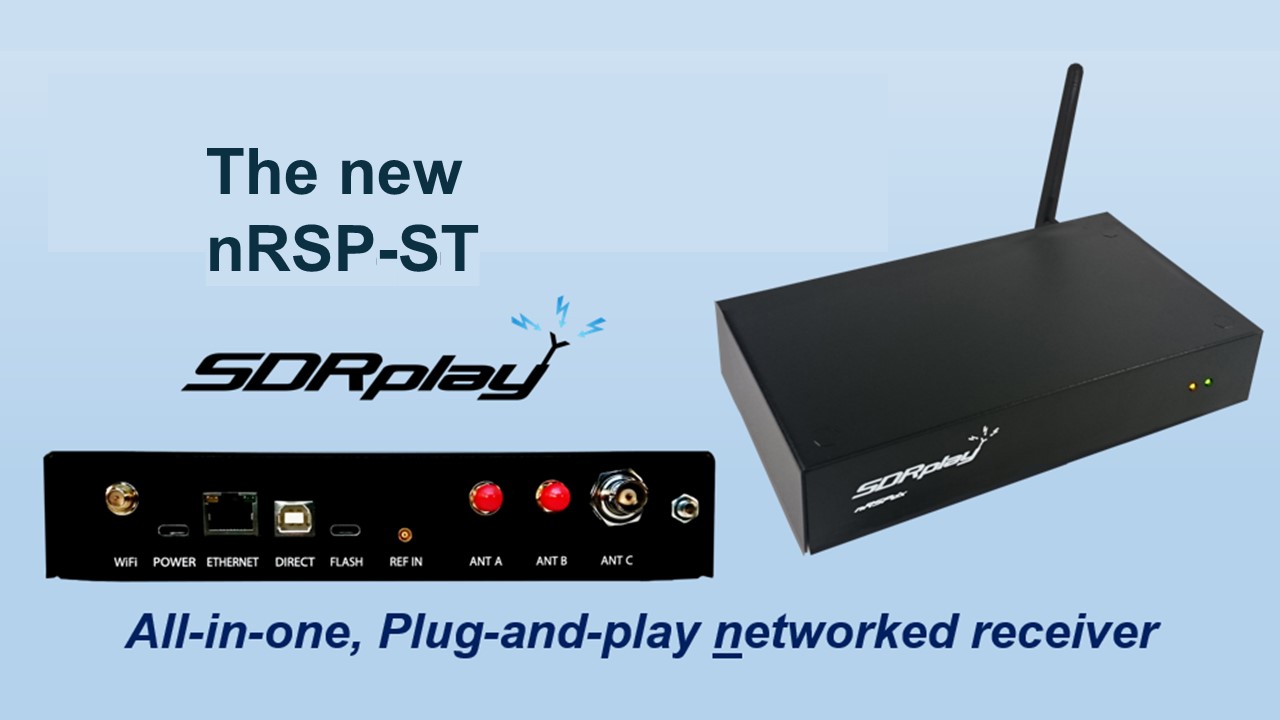
nRSP-ST - SDRplay
SDRplay nRSP-ST Networked 'Plug and Play' SDR Receiver

Key features include 14-bit resolution, up to 10 MHz of spectrum visibility, and built-in support for remote access over the network—perfect for shared club use.

Antenna Connections

  • Port A: Connected to our satellite cross-Yagi antennas for 2 meters (144 MHz) and 70 cm (432 MHz)—ideal for listening to amateur satellite passes (FM, SSB, or digital).
  • Port C: Connected to the clubhouse end-fed HF antenna (also used for Winlink operations), providing excellent HF coverage.

Switch between ports as needed for your monitoring interests.

How to Access the nRSP-ST

You must be connected to the clubhouse network—either locally (when at the clubhouse) or remotely via our VPN.

  • Full-Featured Access: Use the free SDR Connect software (available for Windows, macOS, and Linux from the SDRplay website). This provides complete SDR capabilities, including wide bandwidth, advanced decoding, and spectrum visualization.Introduction to SDRConnect (VID679)

Satellite Antenna Control

When using Port A for satellite listening, you can remotely point the antennas via a separate web interface: http://192.168.50.64:1880/ui. This Node-RED dashboard allows azimuth and elevation control for tracking passing satellites.

Popular Uses

  • Monitoring HF propagation with WSPR or FT8
  • Meteor scatter reception on 6 meters or VHF
  • Listening to amateur satellites (LEO FM repeaters, linear transponder birds)
  • General band scanning and weak-signal work
  • Remote participation in nets or contests when you can’t operate from home

Note: This is a shared resource—please be considerate of other members who may want to use it. Avoid long unattended sessions during peak times, and log off when finished. Clubhouse network bandwidth is limited so use the smallest bandwidth and highest decimation factor possible for your needs. Use of this radio is still in the experimental stage and we may need to limit SDR Connect functionality and only allow web connections if too much bandwidth gets tied up by users of this device.

For more details on the nRSP-ST, visit the manufacturer’s page: SDRplay nRSP-ST.

If you need help with access, VPN setup, or getting started, ask at a club meeting or Tech Saturday!

Archives

  • July 2024
  • November 2023
  • April 2023
  • March 2023
  • June 2022
  • July 2021
  • April 2021
  • March 2021
  • September 2020
  • September 2019
  • August 2019
  • July 2019
  • June 2019
  • December 2018
  • November 2018
  • October 2018
  • September 2018
  • August 2018
  • July 2018
  • June 2018
  • May 2018
  • April 2018

Categories

  • Balloon
  • Clubhouse Infrastructure
  • Digital Position Tracking
  • Raspberry Pi
  • Satellite Images
  • Satellite Operations
  • Satellite Telemetry
  • SDR
  • Uncategorized

Meta

  • Log in
  • Entries feed
  • Comments feed
  • WordPress.org
  • Home
  • Clubhouse
    • The GCARC Clubhouse
    • Grounding Project
    • Networking Infrastructure
    • Work and Test Bench
    • Clubhouse Satellite Station
      • Satellite Rotator Controller
    • SatNOGS Ground Station
    • Earth-Moon-Earth (EME)
    • Discovery Satellite Snooping Dish
    • GOES-19 Satellite Reception
    • Clubhouse Remote nRSP-ST Resource
    • Skunkworks GitHub Resource
    • ISS SSTV
    • NOAA Weather Fax
    • ADS-B
  • Technical Activities and Resources
    • 3D Printed Projects
    • DMR
      • What is a DMR Codeplug?
        • What Are DMR Channels?
        • What Are DMR Timeslots?
        • What is a Talkgroup in DMR?
        • What Are DMR Zones?
      • What is a DMR Hotspot?
      • Configuring DMR Hotspot for GCARC Talk Group
      • Using DM-1701 CPS Program
      • Open GD77 on Baofeng DM1701
    • Software-Defined Radios
      • Software Defined Radio Demystified
      • Installing an RTL-SDR on a Windows PC
      • SDR Tech Saturday Presentation January 2025
      • SDR Client Applications for Mac
      • Creating a PiAware Station to Track Airplanes
        • Installing PiAware Using the Prebuilt SD Card Image with Raspberry Pi Imager
        • Installing PiAware using Command Line Commands
    • Meshtastic
      • Getting Started with Meshtastic on 915 MHz
      • How to Join the GCARC Channel on Your Meshtastic Device Using a QR Code
      • Installing the Meshtastic CLI on a Windows PC
      • Window-Mounted 915 MHz Meshtastic Yagi Antenna Project
      • Meshtastic CLI Commands
    • Exploring Ham Radio Digital Modes: Packet Radio and WSJT-X
      • Packet Radio (AX.25) in Amateur Digital Communications
      • Exploring WSJT Digital Modes
    • BTECH UV-PRO Radio
      • Satellite Mode for the UV-PRO
    • TIDRADIO H3 Resources
      • TIDRADIO TD-H3 Transceiver: Comprehensive Briefing
      • Overview of Stock Firmware Menu System
      • Comparison of Stock TIDRADIO Firmware vs. nicFW V2 Firmware
    • Balloon Project
      • Balloon Launch – 2025-03-17
    • Tech Saturday Presentations
  • STEM Club and Camp
  • Public Service
    • Winlink VHF and HF Gateways
    • APRS Weather Reporting Station
    • AREDN Development
  • The Foundation
  • Blog
  • Contact

Gloucester County Amateur Radio Club 2026 . Powered by WordPress