
Creating a PiAware ADS-B receiver is an exciting and accessible project that turns a simple Raspberry Pi into a powerful tool for tracking real-time aircraft movements in your area—and beyond. All you need is a Raspberry Pi (models 3, 4, 5, or Zero 2 W work great), a compatible RTL-SDR USB dongle (a low-cost software-defined radio receiver), a good 1090 MHz antenna (often with a mounting setup for better range), a microSD card, and a power supply. Using the official prebuilt PiAware image from FlightAware (flashed via Raspberry Pi Imager), setup takes just minutes: flash the card, optionally pre-configure WiFi, connect your hardware, power on the Pi, and claim your feeder on the FlightAware website. The system automatically decodes 1090 MHz ADS-B signals broadcast by most commercial aircraft, feeding the data to FlightAware’s global network while running a local web-based interface called SkyAware.
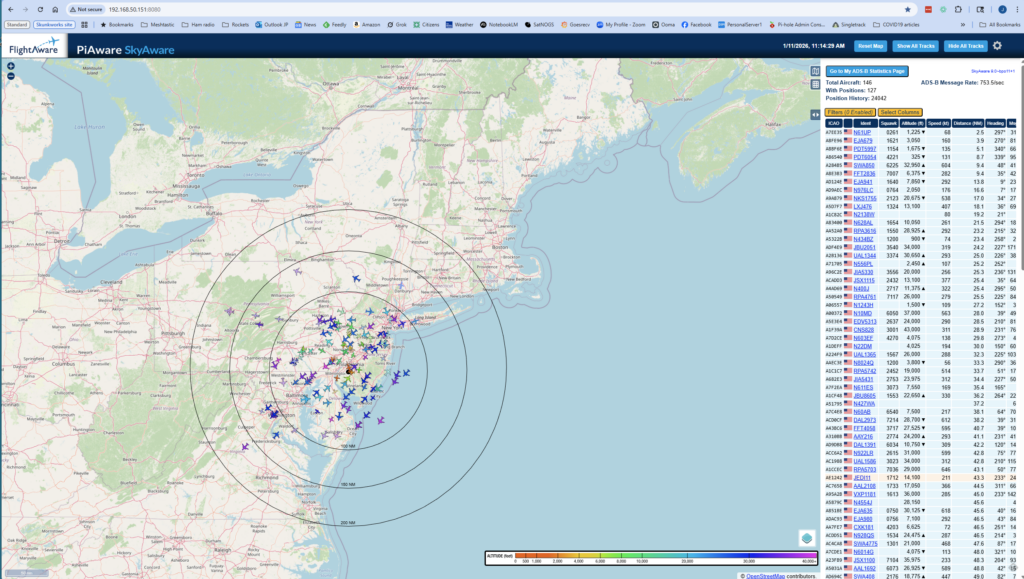
Once running, you’ll gain access to a fascinating live view of aviation in action. The PiAware SkyAware dashboard (shown in the accompanying picture) displays an interactive map with aircraft icons, flight paths, altitudes, speeds, flight numbers, and more—often revealing dozens or even hundreds of planes overhead, depending on your location and antenna placement. You’ll see detailed statistics on your receiver’s performance, including range (up to 200–400+ km with a good outdoor antenna), message rates, and aircraft tracked over time. Contributing your data earns perks like a free FlightAware Enterprise account upgrade, and you can enjoy the satisfaction of helping build one of the world’s largest real-time flight tracking networks—all from a compact, low-power setup in your home.