
The biggest headache when flashing OpenGD77 firmware on DMR radios is the Windows USB driver situation. The STM32 DFU device that’s used to talk to many radios that are in DFU (firmware programming) mode relies on outdated, often unsigned drivers that Windows 11 routinely blocks via signature enforcement. Even when forced through, the process suffers from frequent timeouts, “device not found” errors, and compatibility crashes in the loader—turning what should be a quick flash into long, frustrating troubleshooting on every PC. At a club work session with multiple radios to upgrade, these issues waste time and kill momentum.
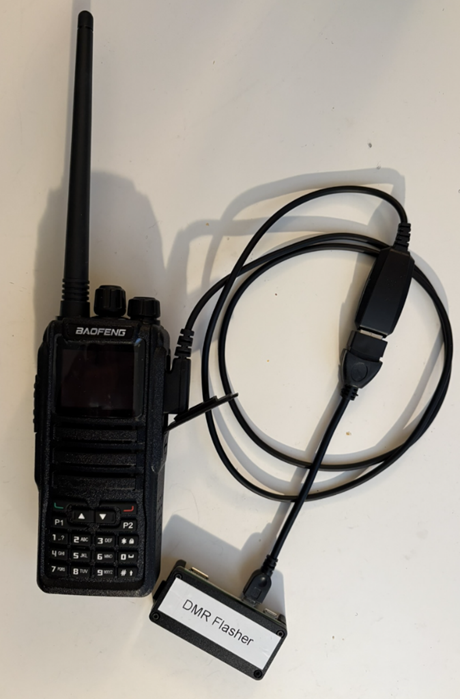
To solve this, we built a dedicated Raspberry Pi Zero W as a standalone, web-based flasher appliance. Linux handles raw USB DFU access natively through libusb—no drivers, no signature enforcement, no permission fights. The Pi boots, joins the clubhouse Wi-Fi and runs a minimal Flask server hosting a simple browser interface at http://dmr-flasher.local:5000 or an IP address assigned at the clubhouse. Any phone, tablet, or laptop on the network can access it without installing anything. Hook the radio’s programming cable up to the Pi, bring up the web interface, select the radio type and driver and it will upload the new firmware to the radio for you. (Thanks to Grok AI for the code, as usual…)
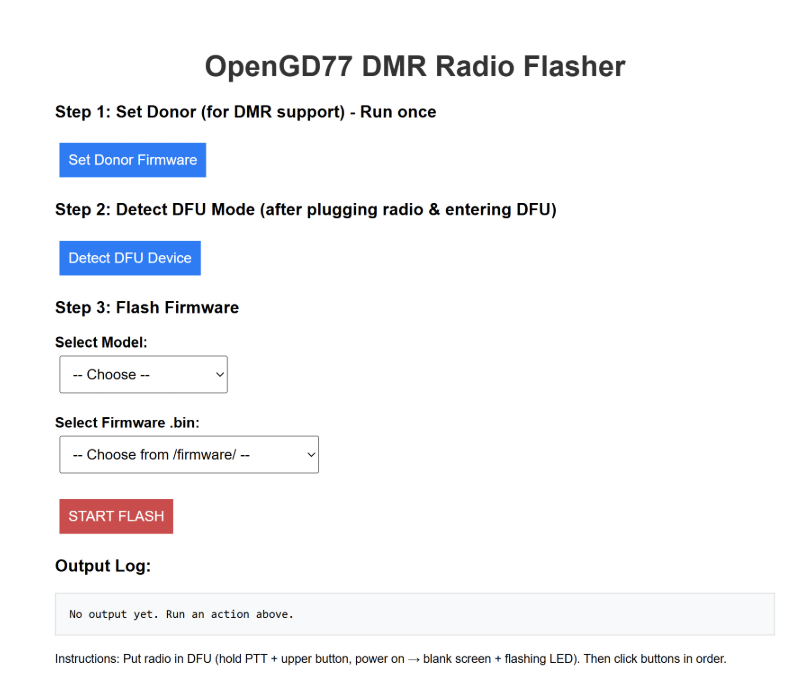
Usage is dead simple: power on the Pi, connect the radio via programming cable, enter DFU mode (PTT + upper side button while powering on until blank screen and flashing LED), open the web page, select the model (e.g., MD-UV380 for TYT variants), choose the .bin file, and click Start Flash. The interface displays real-time progress from the loader script, including donor patching and block writes. When finished, disconnect and reboot the radio into OpenGD77.
We’re going to leave the Pi at the clubhouse for anyone who wants to set up their DMR radio, and will use it for the rescheduled DMR review session that will happen some Saturday in March. So if you have a new radio that you want to get working in OpenGD77 don’t fool around with the Windows drivers, but instead come to the clubhouse and use this Pi to do the flashing. It will save a lot of time.