
Skip to content
Gloucester County Amateur Radio Club

Gloucester County Amateur Radio Club

Skunkworks Advanced Project Team

Menu
  • Home
  • Clubhouse
    • The GCARC Clubhouse
    • Grounding Project
    • Networking Infrastructure
    • Work and Test Bench
    • Clubhouse Satellite Station
      • Satellite Rotator Controller
    • SatNOGS Ground Station
    • Earth-Moon-Earth (EME)
    • Discovery Satellite Snooping Dish
    • GOES-19 Satellite Reception
    • Clubhouse Remote nRSP-ST Resource
    • Skunkworks GitHub Resource
    • ISS SSTV
    • NOAA Weather Fax
    • ADS-B
  • Technical Activities and Resources
    • 3D Printed Projects
    • DMR
      • What is a DMR Codeplug?
        • What Are DMR Channels?
        • What Are DMR Timeslots?
        • What is a Talkgroup in DMR?
        • What Are DMR Zones?
      • What is a DMR Hotspot?
      • Configuring DMR Hotspot for GCARC Talk Group
      • Using DM-1701 CPS Program
      • Open GD77 on Baofeng DM1701
    • Software-Defined Radios
      • Software Defined Radio Demystified
      • Installing an RTL-SDR on a Windows PC
      • SDR Tech Saturday Presentation January 2025
      • SDR Client Applications for Mac
      • Creating a PiAware Station to Track Airplanes
        • Installing PiAware Using the Prebuilt SD Card Image with Raspberry Pi Imager
        • Installing PiAware using Command Line Commands
    • Meshtastic
      • Getting Started with Meshtastic on 915 MHz
      • How to Join the GCARC Channel on Your Meshtastic Device Using a QR Code
      • Installing the Meshtastic CLI on a Windows PC
      • Window-Mounted 915 MHz Meshtastic Yagi Antenna Project
      • Meshtastic CLI Commands
    • Exploring Ham Radio Digital Modes: Packet Radio and WSJT-X
      • Packet Radio (AX.25) in Amateur Digital Communications
      • Exploring WSJT Digital Modes
    • BTECH UV-PRO Radio
      • Satellite Mode for the UV-PRO
    • TIDRADIO H3 Resources
      • TIDRADIO TD-H3 Transceiver: Comprehensive Briefing
      • Overview of Stock Firmware Menu System
      • Comparison of Stock TIDRADIO Firmware vs. nicFW V2 Firmware
    • Balloon Project
      • Balloon Launch – 2025-03-17
    • Tech Saturday Presentations
  • STEM Club and Camp
  • Public Service
    • Winlink VHF and HF Gateways
    • APRS Weather Reporting Station
    • AREDN Development
  • The Foundation
  • Blog
  • Contact

Satellite Mode for the UV-PRO

by Stan Slachetka WA2JRZ

The first step is to update the firmware on the UV-PRO to make sure that the Satellite Mode is available. My UV-PRO came loaded with V0.8.4, which didn’t provide satellite tracking.

Updating the firmware is surprisingly easy using the app and consists of a single step. Click on the gear icon the upper right of the main menu (the one with the list of channels), which brings you to the Settings page. There also is information online on how to update the firmware.

Scroll down to Firmware Version and click on the arrow (“greater than”) symbol to the right of the firmware edition number. If you don’t have the latest version of the firmware, it will provide you with the option to update it.
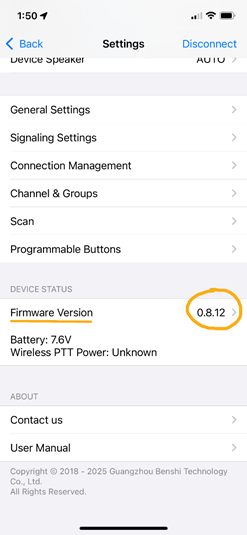
Assuming you are connected to the radio, everything will proceed automatically. You just need to be a bit patient and make sure it goes through all the steps in the process.

If you go to Baofeng Tech website and navigate to the UV-PRO Firmware Changelog, it says that you need at least V 0.8.9-1 — released August 07, 2025—to support Satellite Mode. However, when you update the firmware via the app (I am using the iPhone app) it updates it to V 08.12-2. I believe that V 08.9-1 only provided Satellite Mode for Android phones and the most recent release now provides it for the iPhone. The following screenshots and instructions are for the iPhone. It may be a bit different for the Android.

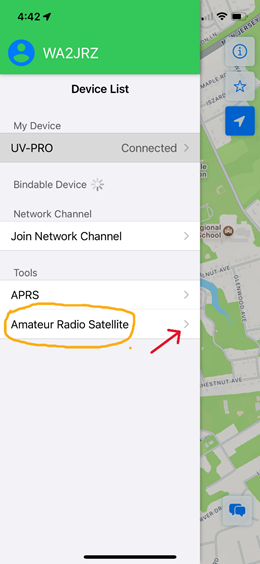
Once the upgrade is complete, you should see Amateur Radio Satellite listed on the main menu screen. Click on the arrow on the right, which will bring you to a list of satellites.
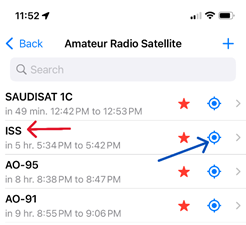
Here is a portion of the list that comes up (there are more satellites as you scroll down). I searched for several popular FM satellites and the ISS, which I listed as favorites (red stars). Assuming that your GPS settings are correct on the radio, it should show you the upcoming passes. This information seems to be generally consistent with GoSatWatch and other satellite tracking websites and applications.
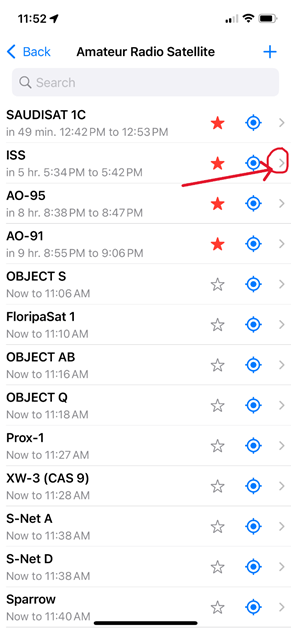
[Note: The SAUDISAT 1C is SO-50.]

Clicking on the right-hand arrow gives you additional information about the satellite or ISS.
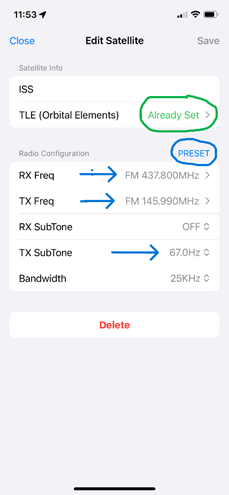
The orbital elements are already set. If it is an FM satellite you can click on Preset, which will provide the relevant transmit and receive frequencies, as well as the transmit CTCSS tone. Other satellites don’t have the Preset parameters, which must be set manually.

Once saved, you can click on the blue icon to show the selected satellite or ISS on the map in the app.
This will bring up the following map:
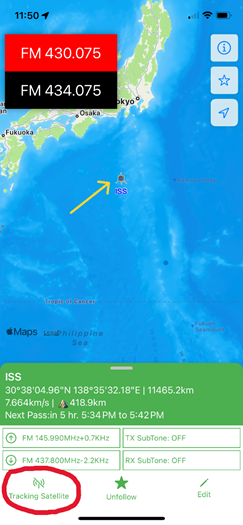
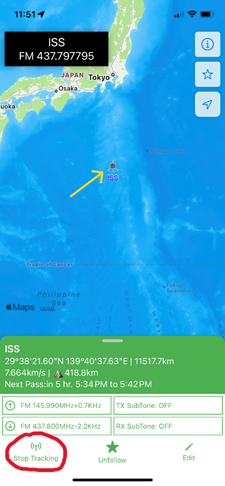
By clicking on Tracking Satellite, the app will start tracking the satellite in real time and set the radio to the proper receiving and transmit frequencies.
Here is a photo of what you will see on the radio screen:
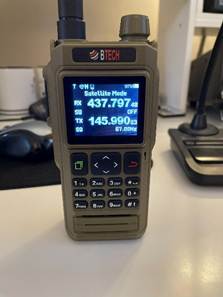
The CTCSS tone is also set. (Note: I noticed that this does not appear in the information on the bottom of the map, but it is set on the radio)

A great feature is that the doppler shift is controlled by the app. You will not need to make any manual adjustments on the radio or add doppler shift frequencies into the memory.

Archives

  • July 2024
  • November 2023
  • April 2023
  • March 2023
  • June 2022
  • July 2021
  • April 2021
  • March 2021
  • September 2020
  • September 2019
  • August 2019
  • July 2019
  • June 2019
  • December 2018
  • November 2018
  • October 2018
  • September 2018
  • August 2018
  • July 2018
  • June 2018
  • May 2018
  • April 2018

Categories

  • Balloon
  • Clubhouse Infrastructure
  • Digital Position Tracking
  • Raspberry Pi
  • Satellite Images
  • Satellite Operations
  • Satellite Telemetry
  • SDR
  • Uncategorized

Meta

  • Log in
  • Entries feed
  • Comments feed
  • WordPress.org
  • Home
  • Clubhouse
    • The GCARC Clubhouse
    • Grounding Project
    • Networking Infrastructure
    • Work and Test Bench
    • Clubhouse Satellite Station
      • Satellite Rotator Controller
    • SatNOGS Ground Station
    • Earth-Moon-Earth (EME)
    • Discovery Satellite Snooping Dish
    • GOES-19 Satellite Reception
    • Clubhouse Remote nRSP-ST Resource
    • Skunkworks GitHub Resource
    • ISS SSTV
    • NOAA Weather Fax
    • ADS-B
  • Technical Activities and Resources
    • 3D Printed Projects
    • DMR
      • What is a DMR Codeplug?
        • What Are DMR Channels?
        • What Are DMR Timeslots?
        • What is a Talkgroup in DMR?
        • What Are DMR Zones?
      • What is a DMR Hotspot?
      • Configuring DMR Hotspot for GCARC Talk Group
      • Using DM-1701 CPS Program
      • Open GD77 on Baofeng DM1701
    • Software-Defined Radios
      • Software Defined Radio Demystified
      • Installing an RTL-SDR on a Windows PC
      • SDR Tech Saturday Presentation January 2025
      • SDR Client Applications for Mac
      • Creating a PiAware Station to Track Airplanes
        • Installing PiAware Using the Prebuilt SD Card Image with Raspberry Pi Imager
        • Installing PiAware using Command Line Commands
    • Meshtastic
      • Getting Started with Meshtastic on 915 MHz
      • How to Join the GCARC Channel on Your Meshtastic Device Using a QR Code
      • Installing the Meshtastic CLI on a Windows PC
      • Window-Mounted 915 MHz Meshtastic Yagi Antenna Project
      • Meshtastic CLI Commands
    • Exploring Ham Radio Digital Modes: Packet Radio and WSJT-X
      • Packet Radio (AX.25) in Amateur Digital Communications
      • Exploring WSJT Digital Modes
    • BTECH UV-PRO Radio
      • Satellite Mode for the UV-PRO
    • TIDRADIO H3 Resources
      • TIDRADIO TD-H3 Transceiver: Comprehensive Briefing
      • Overview of Stock Firmware Menu System
      • Comparison of Stock TIDRADIO Firmware vs. nicFW V2 Firmware
    • Balloon Project
      • Balloon Launch – 2025-03-17
    • Tech Saturday Presentations
  • STEM Club and Camp
  • Public Service
    • Winlink VHF and HF Gateways
    • APRS Weather Reporting Station
    • AREDN Development
  • The Foundation
  • Blog
  • Contact

Gloucester County Amateur Radio Club 2026 . Powered by WordPress