
Skip to content
Gloucester County Amateur Radio Club

Gloucester County Amateur Radio Club

Skunkworks Advanced Project Team

Menu
  • Home
  • Clubhouse
    • The GCARC Clubhouse
    • Grounding Project
    • Networking Infrastructure
    • Work and Test Bench
    • Clubhouse Satellite Station
    • SatNOGS Ground Station
    • Earth-Moon-Earth (EME)
    • Discovery Satellite Snooping Dish
    • GOES-19 Satellite Reception
    • Clubhouse Remote nRSP-ST Resource
    • Skunkworks GitHub Resource
    • ISS SSTV
    • NOAA Weather Fax
    • ADS-B
  • Technical Activities and Resources
    • 3D Printed Projects
    • DMR
      • Using DM-1701 CPS Program
      • Open GD77 on Baofeng DM1701
    • Software-Defined Radios
      • Installing an RTL-SDR on a Windows PC
      • Software Defined Radio Demystified
    • Meshtastic
      • Getting Started with Meshtastic on 915 MHz
      • How to Join the GCARC Channel on Your Meshtastic Device Using a QR Code
      • Window-Mounted 915 MHz Meshtastic Yagi Antenna Project
    • BTECH UV-PRO Radio
      • Satellite Mode for the UV-PRO
    • TIDRADIO H3 Resources
      • TIDRADIO TD-H3 Transceiver: Comprehensive Briefing
      • Overview of Stock Firmware Menu System
      • Comparison of Stock TIDRADIO Firmware vs. nicFW V2 Firmware
    • Balloon Project
      • Balloon Launch – 2025-03-17
    • Tech Saturday Presentations
  • STEM Club and Camp
  • Public Service
    • Winlink VHF and HF Gateways
    • APRS Weather Reporting Station
    • AREDN Development
  • The Foundation
  • Blog
  • Contact

How to Join the GCARC Channel on Your Meshtastic Device Using a QR Code

The GCARC club has a pre-configured secondary channel for private club communications. You’re joining this existing channel (not creating a new one—do not manually add or create a “GCARC” channel, as that would create a duplicate with a mismatched encryption key and prevent you from connecting to the group).

Channels are shared via QR codes (or links), which automatically apply the correct name and encryption key (PSK).

Important Notes:

  • You must join the channel individually on each of your Meshtastic devices. Settings are stored on the radio itself, not globally in the app.
  • If you have multiple nodes, repeat the process for each one by first connecting the app to that specific device.

Step-by-Step Instructions (Direct QR Scan in Phone Camera)

This method uses your phone’s built-in camera to scan the QR code, which then opens directly in the Meshtastic app for confirmation.

  1. Open the Meshtastic App on your phone (Android or iOS).
  2. Connect to the Specific Device: Go to the Nodes tab and ensure you’re paired and actively connected via Bluetooth to the exact radio you want to update. (Switch connections if needed for multiple devices.)
  3. Scan the QR Code with Your Phone’s Camera: Open your phone’s default camera app (or any QR scanner). Point it at the official GCARC channel QR code below. The phone will detect the QR code and show a notification or link (often “Open in Meshtastic” or a meshtastic:// URL).
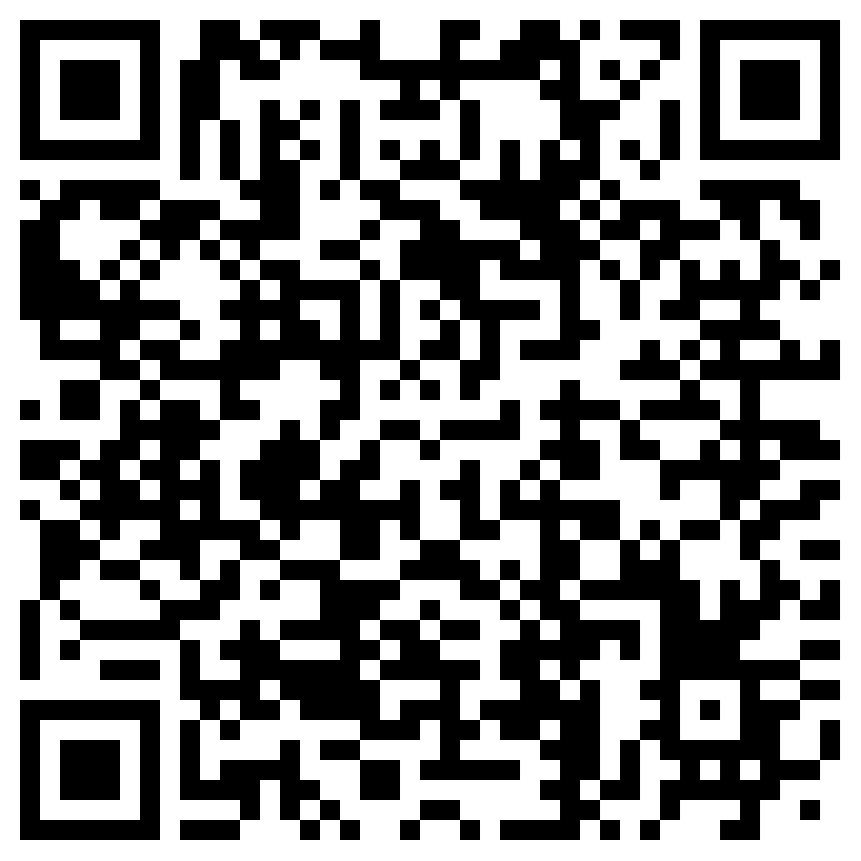
  1. Confirm and Add in the Meshtastic App: Tap the notification/link to open it in the Meshtastic app. You’ll see a confirmation page with the channel details. Tap “Save” (or confirm) to join the channel. The GCARC channel will now appear in your Channels list (as a secondary channel below the primary/default one). Don’t hit “Save” multiple times or you’ll wind up duplicating the channel in your device.
  2. Once joined, messages sent to the GCARC channel will appear automatically in your Messages view when that channel is selected. You can easily switch between the public/default channel and GCARC for different conversations.

If the link doesn’t open in the app or the channel doesn’t appear, ensure the Meshtastic app is installed/updated, your Bluetooth connection is active, and try again. And once you’ve done this successfully send a message out to other users on that channel letting everyone know that you’re set!

Welcome to the GCARC channel—see you on the mesh!

Archives

  • July 2024
  • November 2023
  • April 2023
  • March 2023
  • June 2022
  • July 2021
  • April 2021
  • March 2021
  • September 2020
  • September 2019
  • August 2019
  • July 2019
  • June 2019
  • December 2018
  • November 2018
  • October 2018
  • September 2018
  • August 2018
  • July 2018
  • June 2018
  • May 2018
  • April 2018

Categories

  • Balloon
  • Clubhouse Infrastructure
  • Digital Position Tracking
  • Raspberry Pi
  • Satellite Images
  • Satellite Operations
  • Satellite Telemetry
  • SDR
  • Uncategorized

Meta

  • Log in
  • Entries feed
  • Comments feed
  • WordPress.org
  • Home
  • Clubhouse
    • The GCARC Clubhouse
    • Grounding Project
    • Networking Infrastructure
    • Work and Test Bench
    • Clubhouse Satellite Station
    • SatNOGS Ground Station
    • Earth-Moon-Earth (EME)
    • Discovery Satellite Snooping Dish
    • GOES-19 Satellite Reception
    • Clubhouse Remote nRSP-ST Resource
    • Skunkworks GitHub Resource
    • ISS SSTV
    • NOAA Weather Fax
    • ADS-B
  • Technical Activities and Resources
    • 3D Printed Projects
    • DMR
      • Using DM-1701 CPS Program
      • Open GD77 on Baofeng DM1701
    • Software-Defined Radios
      • Installing an RTL-SDR on a Windows PC
      • Software Defined Radio Demystified
    • Meshtastic
      • Getting Started with Meshtastic on 915 MHz
      • How to Join the GCARC Channel on Your Meshtastic Device Using a QR Code
      • Window-Mounted 915 MHz Meshtastic Yagi Antenna Project
    • BTECH UV-PRO Radio
      • Satellite Mode for the UV-PRO
    • TIDRADIO H3 Resources
      • TIDRADIO TD-H3 Transceiver: Comprehensive Briefing
      • Overview of Stock Firmware Menu System
      • Comparison of Stock TIDRADIO Firmware vs. nicFW V2 Firmware
    • Balloon Project
      • Balloon Launch – 2025-03-17
    • Tech Saturday Presentations
  • STEM Club and Camp
  • Public Service
    • Winlink VHF and HF Gateways
    • APRS Weather Reporting Station
    • AREDN Development
  • The Foundation
  • Blog
  • Contact

Gloucester County Amateur Radio Club 2025 . Powered by WordPress