
A beginner’s field guide to working the Perseids meteor shower on 6 meters from the W2MMD clubhouse using WSJT-X MSK144 — how it works, the exact software settings, the QSO process, where to point the beam, and a step-by-step plan for the Flex 6400 / 500 W station.
At a glance — the W2MMD recipe
- Band / frequency: 6 meters, 50.260 MHz (MSK144 calling frequency)
- Mode: WSJT-X, MSK144, 15-second sequences
- Best hours: 4:00–6:00 AM local is prime; signals fall off after 6 AM
- Beam: point west to west-northwest (toward the activity), ~290–300°
- Power: Flex 6400 driving the 500 W amplifier; aim for ~500 W output
- Coordinate on: Ping Jockey Central; watch yourself on PSK Reporter
1. How to Use This Guide
This guide is written for members who have never run WSJT-X or worked meteor scatter. It explains what meteor scatter is, how the MSK144 mode pulls a callsign out of a fraction-of-a-second “ping,” exactly which software settings to use, and how to run a contact from start to finish. The final section is a step-by-step checklist for setting up and operating the W2MMD clubhouse station — if you only read one section the morning of an operation, read that one (Section 9).
Meteor scatter is a patient mode. Contacts can take a few minutes — sometimes longer — because you need a meteor to streak across the sky at the exact moment both stations are pointed and timed correctly. Do not be discouraged by long silences; they are completely normal.
2. What Is Meteor Scatter?
Every day roughly 100,000 meteors enter the Earth’s atmosphere. Most are no bigger than a grain of sand — dust left behind by comets. As each one burns up about 50 to 75 miles (80–120 km) up, it briefly ionizes a long, thin trail in the E layer of the ionosphere. That trail of charged particles acts like a temporary mirror in the sky. A VHF signal that hits it can be reflected back down to Earth hundreds of miles away — far beyond the normal line-of-sight range of 6 meters.
The trail only lasts from a fraction of a second up to a few seconds, so the reflected signal arrives as a short burst. Hams call that burst a “ping.” A strong, long-lasting trail produces a “burn” that can carry a signal for several seconds; a tiny trail gives a ping lasting only milliseconds. MSK144 is designed to make a complete contact out of pings that short.
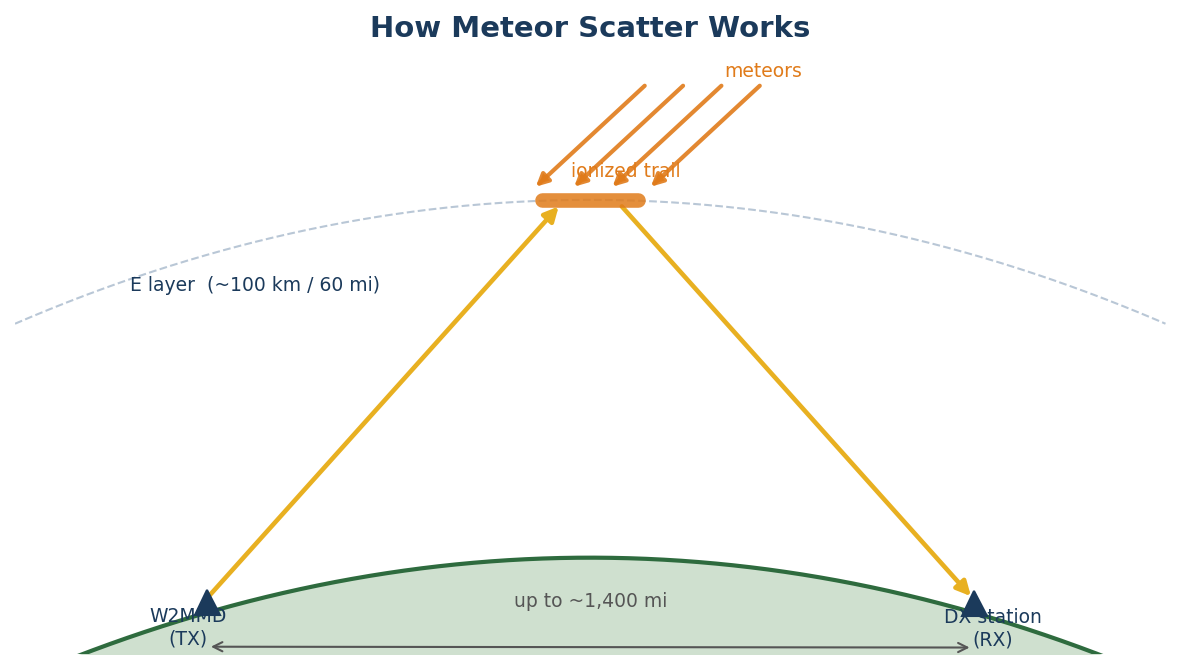
Because the signal bounces off the relatively stationary ionized trail — not off the fast-moving meteor itself — there is very little Doppler shift. The practical maximum distance for a single hop is about 1,400 to 1,500 miles. From the clubhouse in southern New Jersey (grid FM29) that ring covers most of the eastern two-thirds of the United States and parts of Canada: the upper Midwest, the Plains, the Southeast, Texas, and the Maritimes.
3. When to Operate — the Perseids and the Prime Hours
Why mornings win
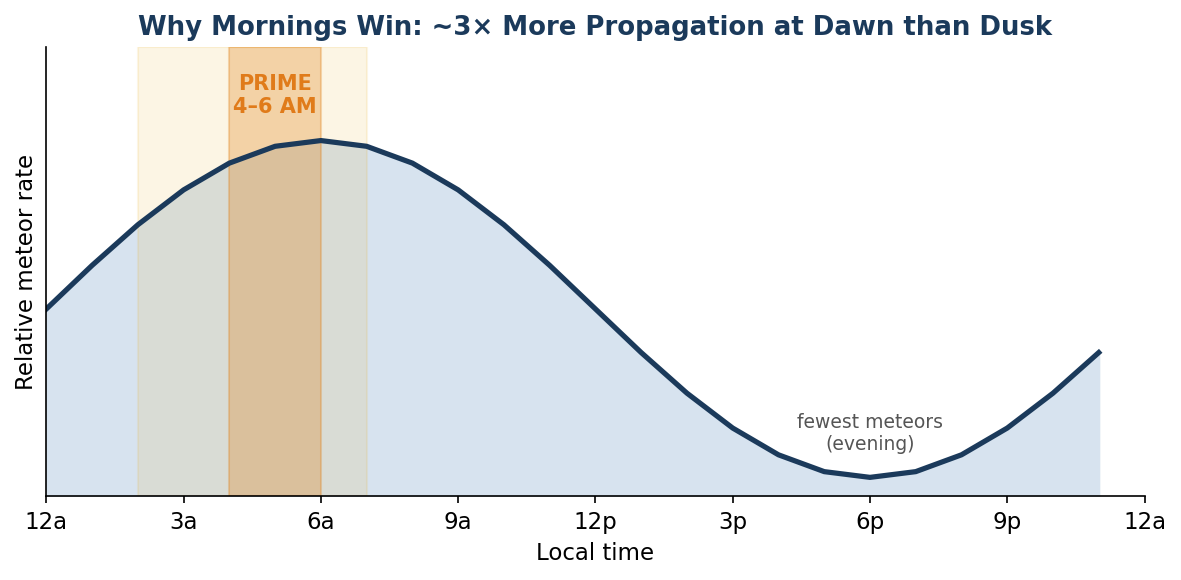
There is roughly three times more meteor propagation at 6 AM than at 6 PM local time. The reason is geometry: in the pre-dawn hours your side of the Earth is turned into the direction of its orbit, so it sweeps up meteors head-on at speeds up to 72 km/s. In the evening the meteors have to “catch up” to the Earth and arrive far slower. Faster meteors ionize their trails more strongly, so dawn produces both more pings and stronger ones.
W2MMD operating hours — from our own experience
- Prime window: 4:00–6:00 AM local time. This is when we make the most contacts.
- Worth a try: 2:00–4:00 AM (building) and the first hour after 6 AM (fading).
- Diminishing returns: After about 7 AM, signals drop off noticeably. Plan to wrap up.
Radio doesn’t care about clouds or moonlight — unlike visual meteor watching, meteor scatter works in daylight and overcast. The clock matters far more than the sky.
Why the Perseids
On any morning there are enough random meteors to work. During a major shower the rate climbs dramatically, making it the best time for a club operation. The Perseids are one of the two biggest showers of the year (the Geminids in December are the other).
| Perseids fact | Detail |
|---|---|
| Active period | Roughly July 17 – August 24 |
| Peak night | August 12–13 (plan the main effort for the mornings of Aug 11, 12, and 13) |
| Peak rate | Up to ~100 meteors/hour at the visual zenith; excellent for radio |
| Radiant | In the constellation Perseus; rises late evening, highest at dawn — reinforcing the morning advantage |
| Velocity | Fast (~59 km/s), which means strong ionization and good pings |
Note: confirm the exact peak and any moon interference for the current year before the event — but remember moonlight has no effect on radio meteor scatter. Dates above are typical and apply to August 2026.
4. How MSK144 Pulls a Signal Out of a Ping
MSK144 is a digital mode in the free WSJT-X program (by Joe Taylor, K1JT, and team) built specifically for the very short, very weak bursts that meteor trails produce. Understanding how it works will make you a better operator.
A whole message in 72 milliseconds
A standard MSK144 message (your callsign, the other station, a grid or report) is compressed to just 72 information bits. WSJT-X adds an 8-bit checksum to virtually eliminate false decodes, then uses a forward-error-correction code (a Low-Density Parity-Check, or LDPC, code) to expand it. Two 8-bit synchronizing patterns are inserted so the decoder can lock onto the start of a frame, giving a 144-bit frame (that’s where the “144” in the name comes from).
Those 144 bits are sent using Offset Quadrature Phase-Shift Keying (OQPSK) at 2000 baud. The “offset” and half-sine pulse shaping keep the transmitted signal at constant power, which is ideal for running an amplifier hard. At 2000 baud the entire 144-bit frame is transmitted in just 72 milliseconds — an effective rate of about 250 characters per second.
The key idea: repeat, repeat, repeat
Because each frame is only 72 ms long, WSJT-X transmits it over and over for the full 15-second sequence — more than 200 times. The receiver does not have to catch a whole 15-second transmission the way FT8 does. It only has to catch one clean copy of that 72-ms frame during a single ping. That is exactly why a meteor trail lasting a fraction of a second can deliver a complete, decoded message.
Real-time decoding — a big difference from FT8
Unlike FT8, where you wait the full 15 seconds before anything appears, the MSK144 decoder runs continuously during the receive period. Decodes pop into the Band Activity window the instant a ping arrives — you will literally hear a short “pip” and see the callsign appear together.
For 2 meters and weaker paths there is an even shorter Sh (“Short-hand”) message of about 20 ms that carries only the essential hand-shake messages (R+rpt, RRR, 73). Shorter frames decode on even tinier pings. Sh is standard on 2 m and up; it is not normally used on 6 m, where the full 72-ms messages work fine.
5. MSK144 Settings in WSJT-X
Most WSJT-X settings (rig control, audio/DAX, your callsign and grid) are the same as you would use for FT8. The items below are the ones that are specific to MSK144 meteor scatter. Set these once and the configuration is saved.
Reference screenshots
The settings panels described here are shown with full WSJT-X screenshots in Jim Wilson K5ND’s article “Meteor Scatter: Getting on the Air — How it Works.” Keep that page open on a second screen the first time you set the station up.
5.1 Settings → General tab (one time)
| Checkbox / field | Set it to |
|---|---|
| Enable VHF and submode features | CHECKED — reveals MSK144 and the F Tol / T/R controls |
| MSK144/Q65: Tx until 73 is received | CHECKED — keeps you transmitting until the other station’s 73 gets through |
| My Call / My Grid | W2MMD / FM29 (use the club’s 6-character grid if known) |
5.2 Main-screen controls
| Control | Value | Why |
|---|---|---|
| Mode | MSK144 | Select via the Mode menu or the MSK button |
| Decode depth | Fast / Normal | Watch the CPU % at the bottom; pick the deepest setting that stays well under 100%. Many ops find Normal best |
| F Tol | 100 – 300 Hz | 300 Hz is a good default; covers a station a little off frequency |
| Rx | 1500 Hz | Standard audio receive frequency — leave it here |
| T/R | 15 s | Standard meteor-scatter sequence length |
| Tx even/1st | UNCHECKED | W2MMD beams west, so we transmit on the ODD (2nd) sequence — see Section 7 |
5.3 RRR instead of RR73
On most modes you finish with “RR73.” On meteor scatter a single RR73 often will not make it through, and WSJT-X may log the contact before the other station has actually confirmed. Use RRR instead, and keep sending it until you receive the other station’s 73. With the “Tx until 73 is received” box checked the software will do this for you. To switch Tx4 to RRR: double-click the Tx4 button, or press Ctrl+R. (Alt+R selects RR73.)
5.4 Contest, Sh, and QSY modes (when you need them)
| Mode | What it does / when to use it |
|---|---|
| NA VHF Contest | Settings → Advanced → check “Special operating activity” → NA VHF. Shortens the exchange to grids only. Optional on 6 m; common in VHF contests |
| Sh (Short-hand) | 20 ms messages for the hand-shake. Used on 2 m and up for the weakest pings. NOT normally used on 6 m |
| CMSH | Contest Mode + Short-hand together — a 2 m technique, not needed for our 6 m Perseids work |
| QSY QSO | Call CQ on 50.260 but finish on a second frequency. Only for very busy openings or contests. Requires Radio-tab Split = “Rig” or “Fake It” |
For a beginner 6-meter Perseids session you can ignore Sh, CMSH, and QSY entirely. Plain MSK144 with the settings in 5.1–5.3 is all you need.
6. The QSO Process — Making a Contact
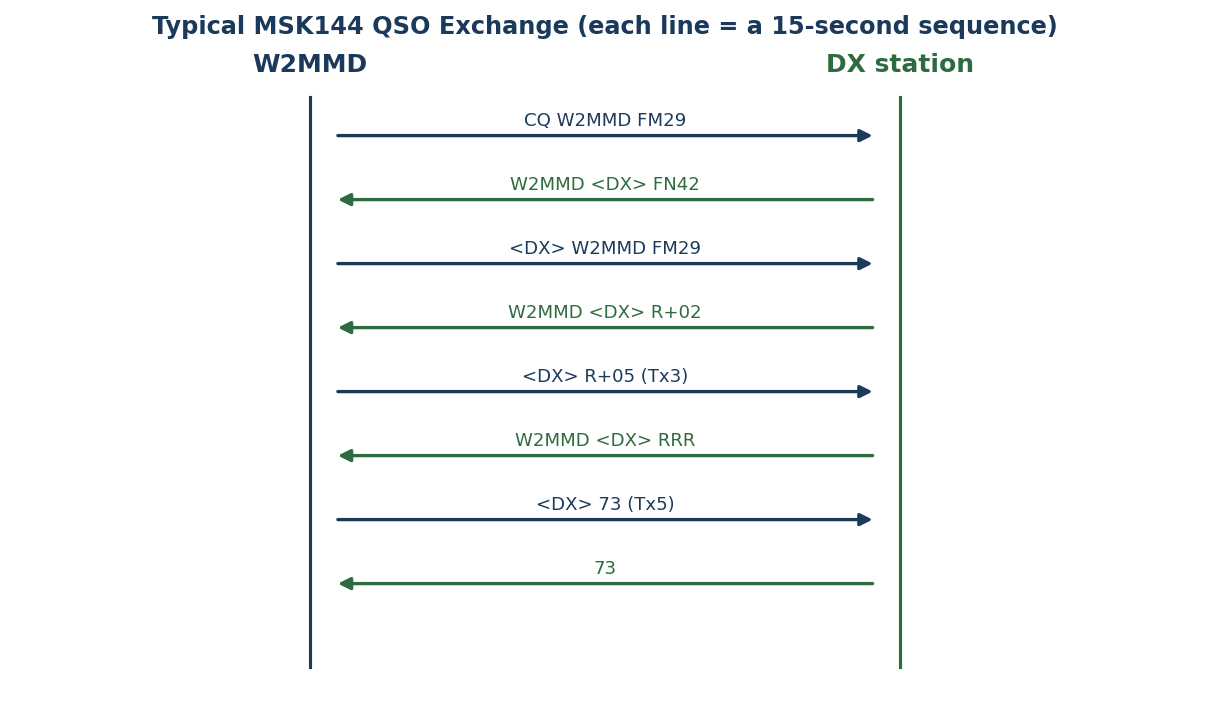
An MSK144 contact follows the same message ladder as FT8, but each step may take several sequences instead of one, because you are waiting on meteors. WSJT-X automates the message order; your job is to double-click the right thing to start and then be patient.
Step by step
- Decide who calls. To answer someone, double-click their CQ in the Band Activity window. To call yourself, enable Tx and send CQ.
- Exchange callsigns and grids. WSJT-X sends “your-call my-call grid.” Wait for the other station’s grid to come back.
- Exchange reports. The report is a signal-strength number such as R+05. Keep sending until you get theirs back with an “R” in front (R+rpt).
- Confirm with RRR. Once you have their R-report, send RRR — repeatedly — until you see their 73.
- Finish with 73. When you receive their 73, send your own 73. The contact is complete and is logged.
Telling a meteor ping from a local signal
Not everything you decode is a meteor. Strong, continuous signals from nearby stations look like long streaks on the Flex waterfall; a true meteor ping is a short, isolated burst. The other station’s grid square is the best clue — a station 900 miles away on a short ping is meteor scatter; a steady local 80 miles away is not.
Watch out for a strong local station on the opposite sequence — it can cover up the weak DX you are trying to hear. If that happens, coordinate so you and the locals share the same sequence.
Patience and coordination. A real 6-meter contact in K5ND’s article took 16 minutes with long silences. That is normal. Using a chat page (Section 8) to agree who transmits first and to both point at each other dramatically improves your odds versus random calling.
7. Pointing the 6-Meter Beam
- Aim where the stations are. From FM29, the active meteor-scatter population sits to our west and southwest — the upper Midwest, the Plains, Texas, and the Southeast. In our 2023 Perseids run we worked Milwaukee, Minneapolis, Kentucky, and Orlando, all on a westerly beam.
- Aim at the meteors, not just the stations. The best reflections come from trails roughly broadside (about 90°) to your path to the other station, and the radiant’s position shifts through the night. In practice a wide-beam 6 m Yagi is forgiving — point toward the target region and adjust empirically.
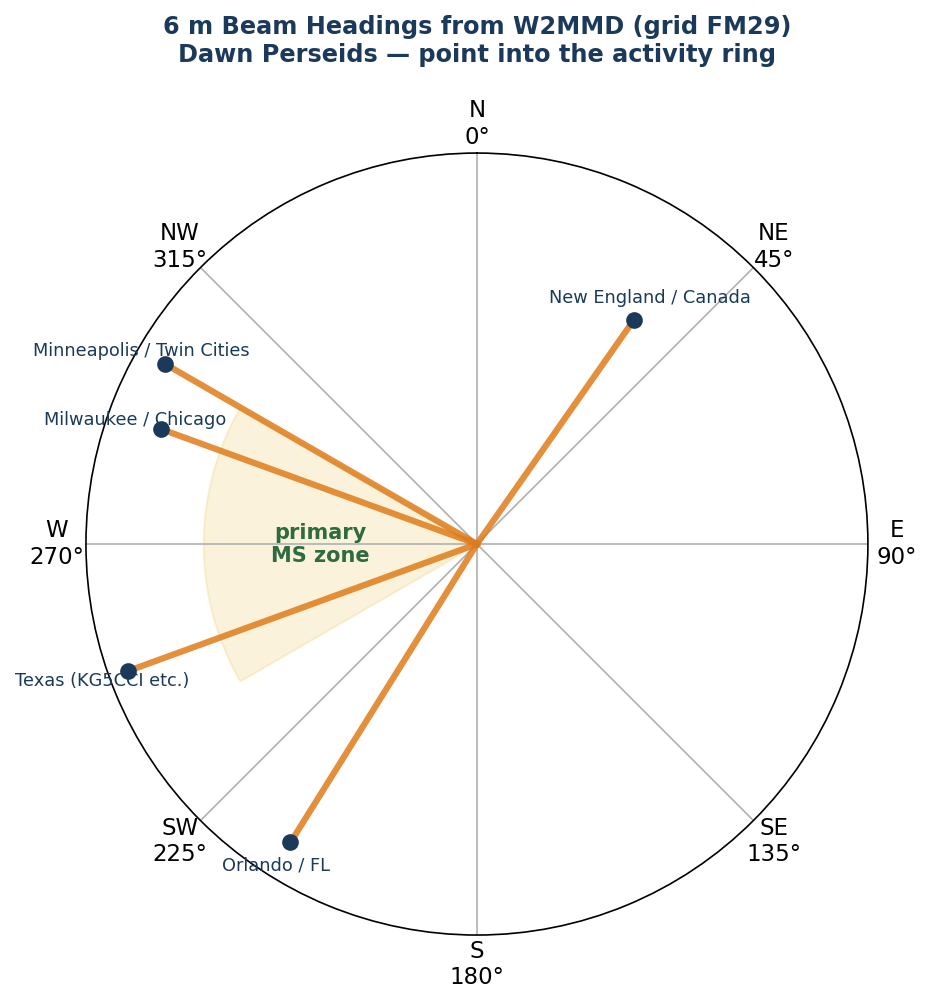
| Target region | Approx. heading | Notes |
|---|---|---|
| Upper Midwest (Minneapolis, Milwaukee, Chicago) | 290–300° (W–WNW) | Primary zone — start here |
| Central Plains / Texas | 245–255° (WSW) | Swing here to find KG5CCI-class stations |
| Southeast / Florida | 210–220° (SW) | Orlando and the Gulf states |
| New England / Maritimes | 35–60° (NE) | Shorter paths; try if west is quiet |
The A/B offset — a refinement, not a requirement
For random meteors, the optimum aim is often offset 10–15° to one side of the direct great-circle path — WSJT-X labels these the “A” and “B” headings and even suggests an elevation. One station uses A, the other B, and which is which can change with the time of day. With our wide-beam Yagi this is a fine-tuning detail — point into the activity ring first; chase A/B offsets only when working a specific distant station.
The free Swan app (swan.ms) uses your location plus live International Meteor Organization data to show, in real time, the best direction to point for current shower activity — the easy answer to “where are the meteors right now?”
8. Spotting, Coordination, and Useful Tools
Random meteor-scatter contacts are rare. Almost everyone coordinates contacts through a chat page first — you agree on frequency, who transmits first, and then both point at each other and start. These are the sites to have open:
| Tool | Address | What it’s for |
|---|---|---|
| Ping Jockey Central | pingjockey.net | The main North American meteor-scatter chat. Post that you’re calling, find a partner, agree on sequence. Start here |
| PSK Reporter | pskreporter.info | Enter W2MMD, pick 6 m — a live map of who is hearing you, with signal levels. Great when calling CQ and hearing nothing |
| ON4KST Chat | on4kst.com | VHF/UHF chat rooms widely used for coordinating, especially longer/DX paths |
| VHF-Chat (Slack) | VHF-Chat Slack workspace | Another popular real-time coordination community |
| Swan | swan.ms | Real-time meteor radiant and best-antenna-direction app (replaces the older Virgo app) |
Quick workflow
Open Ping Jockey and announce “W2MMD QRV 50.260, beaming west, will TX 2nd, who wants a sked?” — confirm a partner — both stations point at each other — start transmitting — use the chat to confirm partial decodes until the contact completes.
9. Step-by-Step: Setting Up and Operating the W2MMD Station
Station: Flex 6400 SDR transceiver → 500 W amplifier → 6 m Yagi (rotatable). Computer running SmartSDR and WSJT-X. This is the sequence to follow on the morning of an operation.
Before you key up — safety and duty cycle
MSK144 transmits a repeating burst for the entire 15-second sequence — effectively a long, near-continuous key-down at full power every 30 seconds (high duty cycle). Make sure the amplifier has good airflow and watch its temperature. Never exceed the amplifier’s ratings, and confirm the antenna/coax is connected and the SWR is low before running power.
Phase 1 — Plan the session (the night before)
- Pick the morning(s): target the mornings of Aug 11, 12, and 13. Be on the air and settled by 3:45 AM so you don’t miss the 4–6 AM prime window.
- Arrange clubhouse access and let members know the start time.
- Check the Swan app or shower calendar for radiant position; confirm no known equipment issues.
Phase 2 — Power up and connect the hardware
- Power on the computer, then the Flex 6400, then SmartSDR. Leave the amplifier OFF (or in standby/bypass) until everything checks out.
- In SmartSDR, create a slice receiver on 50.260 MHz, mode USB. Set the Flex so WSJT-X controls it (CAT) and passes audio over DAX (Phase 3).
- Confirm the 6 m beam is on the amplifier output and the amplifier input is fed from the Flex. Verify the rotator control works.
- Antenna check first: with the amplifier bypassed, transmit a brief low-power test into the beam and confirm low SWR on 50.260. Only then bring the amplifier online.
Phase 3 — Configure WSJT-X for the Flex 6400
- Settings → Radio: Rig = the Flex 6400 (FlexRadio 6xxx, or Hamlib/TCP per the clubhouse setup). CAT = SmartSDR CAT port. PTT method = CAT. Mode = USB or Data/Pkt. Split Operation = Rig or Fake It.
- Settings → Audio: Input = DAX RX audio channel; Output = DAX TX audio channel for the 50.260 slice.
- Settings → General: My Call = W2MMD, My Grid = FM29. Check “Enable VHF and submode features” and “MSK144/Q65: Tx until 73 is received.”
- Set the mode and the MSK144 controls (Section 5): Mode = MSK144; Decode = Fast or Normal; F Tol = 300; Rx = 1500; T/R = 15 s; Tx4 = RRR; Tx even/1st UNCHECKED (we beam west = transmit 2nd/odd).
- Sync the computer clock (Meinberg NTP, Dimension 4, or built-in time sync).
Phase 4 — Set power through the amplifier
- Bring the amplifier out of bypass. Start with the Flex drive LOW (e.g., 5–10 W).
- Use WSJT-X “Tune” to key a steady carrier and slowly raise the Flex drive until the amplifier reaches about 500 W output. Do not exceed the amp’s rating. Keep the Flex below the level that triggers ALC problems.
- Confirm the required drive level for the clubhouse amplifier (gain varies by model) and note it for next time. Watch for clean output — no flat-topping, low reflected power.
- Turn Tune off. You’re ready to operate.
Phase 5 — Point the beam
- Rotate the 6 m beam to 290–300° (west-northwest) as the default — into the upper-Midwest activity ring.
- If the west is quiet, swing toward 245–255° (Texas/Plains) or 210–220° (Southeast). Re-check Swan for the best current direction.
Phase 6 — Operate the prime window (4–6 AM)
- Open Ping Jockey Central and announce W2MMD is QRV on 50.260, beaming west, transmitting 2nd. Line up a sked.
- Answer a CQ (double-click it) or call CQ yourself. Send your grid, then reports, then RRR, then 73 — repeating each step until a ping carries it through (Section 6).
- Use the Flex waterfall to distinguish short meteor pings from steady local signals; use grid squares to confirm a contact is really meteor scatter.
- Log each contact (callsign, grid, time, report). N3FJP/AC Log with WSJT-X logs automatically on completion.
- Watch PSK Reporter to see who is hearing you, and adjust the beam toward where you’re heard.
Phase 7 — Wind down and shut off
- After about 6 AM, expect signals to fade. Work the stragglers, then plan to finish by ~7 AM.
- Put the amplifier in standby/bypass and let its fan cool it before powering off.
- Power down in reverse: amplifier, then WSJT-X, SmartSDR, Flex, computer. Park the beam. Save the log and post results.
Lessons from our last Perseids run
- Saturday morning was by far our most productive period — the morning hours did the work, not the shower’s nighttime peak.
- We didn’t know where to point at first; the Swan app solves that — use it from the start this time.
- A strong local station on the opposite sequence can block weak DX. Coordinate sequence with nearby stations.
- Earlier notes had us transmitting on the EVEN sequence beaming west. The accepted convention is the opposite: an East-Coast station beaming west transmits ODD/2nd. Leave “Tx even/1st” unchecked.
10. Quick-Reference Card
| Setting | Value |
|---|---|
| Band / frequency | 6 m — 50.260 MHz (also 50.265) |
| Mode | MSK144 |
| T/R sequence | 15 s |
| Rx audio | 1500 Hz |
| F Tol | 300 Hz |
| Decode depth | Fast or Normal (keep CPU < 100%) |
| Tx even/1st | UNCHECKED (beam west → transmit 2nd/odd) |
| Tx4 message | RRR (Ctrl+R), not RR73 |
| VHF features | Enabled; “Tx until 73 received” checked |
| Beam heading | 290–300° default (W–WNW) |
| Power | ~500 W out of the amplifier |
| Prime hours | 4:00–6:00 AM local |
| Coordinate on | Ping Jockey Central; watch PSK Reporter |
Message ladder: CQ → grids → R+report → RRR (repeat) → 73. Be patient; any step can take minutes.
11. References
- Jim Wilson, K5ND — “Meteor Scatter: Getting on the Air — How it Works” (primary operating reference and setting screenshots).
- Jim Wilson, K5ND — “Meteor Scatter: A Burst of Excitement,” QST (k5nd.net).
- WSJT-X User Guide (K1JT) — MSK144 section.
- Franke (K9AN) & Taylor (K1JT) — “The MSK144 Protocol for Meteor-Scatter Communication,” QEX.
- GCARC / W2MMD — “Working the Perseids Meteor Shower at W2MMD” (our 2023 write-up).
- Coordination tools — Ping Jockey Central, PSK Reporter, ON4KST, Swan.
Prepared as a club training resource for W2MMD / Gloucester County Amateur Radio Club. Verify event dates, amplifier drive levels, and the station’s exact grid square against current conditions before each operation.
 Save as PDF